 By Admin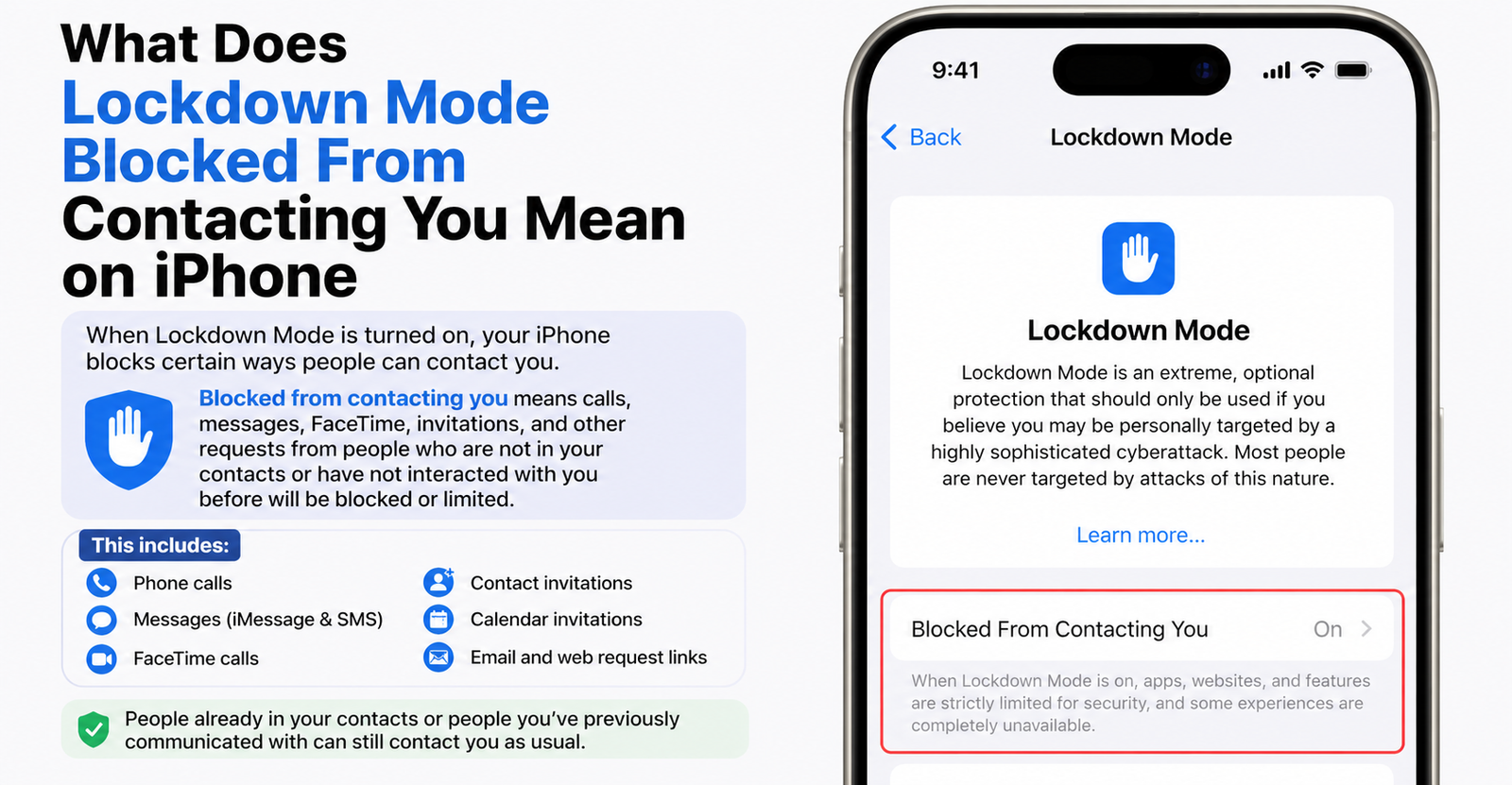
What the Lockdown Mode Notification Usually Means
Seeing the message “Lockdown Mode blocked [person] from contacting you” on your iPhone can feel alarming, especially when the person is someone you know. It may look like Apple blocked a call, text, or iMessage from that contact.
But in many cases, the message is not that simple.
Lockdown Mode is an extreme security setting from Apple. It is designed for people who may be targeted by highly sophisticated digital threats, such as mercenary spyware, advanced hacking attempts, or state-level surveillance. When it is turned on, your device limits certain apps, features, websites, and communication tools to reduce possible attack points.
So when your iPhone says Lockdown Mode blocked someone from contacting you, it usually means Lockdown Mode restricted something connected to that person. That could be a FaceTime request, a message attachment, a link preview, a sticker, a contact-card update, a shared Apple service invite, or another communication-related feature.
The confusing part is that the notification often does not clearly explain what was blocked. It only names the person, which makes it sound more dramatic than it may actually be.
Why Your iPhone May Name Someone You Already Know
One of the most confusing parts of this alert is that it can name someone already saved in your Contacts. That makes people wonder, “Why would Lockdown Mode block someone I trust?”
There are a few possible reasons.
The person may have sent something inside Messages that Lockdown Mode restricts, such as a certain attachment, sticker, or link preview. They may have tried to call through FaceTime in a way that triggered a restriction. Their contact photo, contact card, or Apple ID details may have updated in the background. A feature like Focus Sharing, Home app invitations, or another Apple service may also be involved.
Forum users on Apple Discussions and Privacy Guides have reported seeing this alert even when the named person said they did not call or text. That does not automatically mean the person is lying, and it does not automatically mean your phone was hacked. It may simply mean Apple’s notification is too vague about what actually happened.
That is why this alert should be treated as a security-related notice, not instant proof of danger.
Does Lockdown Mode Block Text Messages?
In general, Lockdown Mode does not block ordinary phone calls or plain text messages. Apple says phone calls and plain text messages continue to work while Lockdown Mode is enabled. Emergency features such as SOS emergency calls are also not affected.
However, Messages does not work exactly the same way in Lockdown Mode.
Most message attachment types are blocked, except for certain images, video, and audio. Some message features, including links and link previews, are also unavailable.
This means a normal text may still arrive, but certain parts of the message may be blocked. For example, if someone sends a sticker, a preview, a special attachment, or another rich message feature, Lockdown Mode may restrict that part of the interaction.
That is why the alert can be misleading. It may say someone was blocked from contacting you, even if the actual text message still came through.
How Lockdown Mode Affects iMessage Attachments and Links
The most common place where people notice Lockdown Mode restrictions is Messages.
Apple designed Lockdown Mode to reduce risky content that could be used in sophisticated attacks. Some spyware attacks have historically used message attachments, previews, or hidden content to target devices. By blocking or limiting those features, Apple reduces the number of ways an attacker could reach your device.
In Messages, this can affect:
message attachments
link previews
stickers
shared links
certain rich media features
some message metadata
TechCrunch tested Lockdown Mode and found that the notification can be confusing. In one test, a contact sent an iMessage while Lockdown Mode was enabled. The recipient still received the message, emojis, and an image, but iMessage stickers were blocked or turned into unusable attachment-like items. The phone still showed a Lockdown Mode notification, which made the situation look more confusing than it really was.
So if you see this alert after someone messages you, the issue may not be the message itself. It may be one part of the message that Lockdown Mode did not allow.
Why FaceTime Calls Can Be Blocked
FaceTime is another major reason this notification may appear.
According to Apple, incoming FaceTime calls are blocked in Lockdown Mode unless you previously called that person or contact within the past 30 days.
This does not mean all FaceTime calls are blocked. It means Lockdown Mode becomes stricter about who can reach you through FaceTime.
For example, the alert may appear if:
someone you have not recently contacted tries to FaceTime you
a known contact calls from a different Apple ID
your contact details for that person are not matching correctly
your device treats the caller as not recently trusted
there is a syncing issue between iCloud Contacts, Google Contacts, or your saved contact list
This is another reason the alert may name someone familiar. Your iPhone may know the person’s name but still treat that particular request as restricted under Lockdown Mode rules.
How Focus Sharing Can Trigger Confusing Alerts
Another possible trigger is Focus Sharing.
Focus is the Apple feature that lets you silence notifications for work, sleep, driving, personal time, or custom modes. When Focus Status is shared, other people may see that your notifications are silenced.
In Lockdown Mode, some connected sharing features may not work normally. Apple says certain Apple services and related features can be limited when Lockdown Mode is on.
This can make the alert confusing because the other person may not have sent a normal message or made a call. Instead, your phone may have blocked or limited a background interaction connected to Focus Status, Focus Sharing, or another service-level feature.
That is why some users see the alert and then find no missed call, no text, and no obvious message thread.
Why Apple Services Like Home and Apple Music May Be Involved
The phrase “contacting you” can also be broader than a normal call or message.
Apple says Lockdown Mode restricts some Apple services, including invitations such as managing a home in the Home app. Shared services and invitations can be limited because they create ways for other accounts to interact with your device.
That means the notification could be connected to something like:
a Home app invitation
a shared Apple Music control request
a Photos or Shared Albums interaction
a contact-card update
an Apple ID based service invite
a background sharing feature
This is why the wording can feel inaccurate. The person may not have been “contacting you” in the everyday sense. They may have triggered an interaction through an Apple service, and Lockdown Mode decided to restrict it.
Does This Mean Your iPhone Was Hacked?
Usually, no.
The notification “Lockdown Mode blocked from contacting you” does not, by itself, mean your iPhone has been hacked. It means Lockdown Mode blocked or limited something it considered risky or restricted.
That is very different from a confirmed compromise.
Lockdown Mode is a defensive feature. Its job is to reduce possible attack paths before anything bad happens. A blocked attachment, restricted FaceTime call, or limited service invitation can simply mean the feature is working as designed.
That said, you should take the alert more seriously if you are a high-risk person. Apple built Lockdown Mode for people who may be targeted by advanced digital threats, including journalists, activists, human rights defenders, government officials, executives, or others who may face targeted spyware attacks.
For most everyday users, the alert is more likely to be confusing than dangerous. For high-risk users, it is worth reviewing carefully.
Why the Notification Feels So Vague
The biggest problem is not always Lockdown Mode itself. The problem is the notification wording.
A better alert would say exactly what happened, such as:
Lockdown Mode blocked an iMessage sticker from this contact
Lockdown Mode blocked a FaceTime call from this Apple ID
Lockdown Mode blocked a Home app invitation
Lockdown Mode blocked a contact photo update
Instead, users often see a broad message saying someone was blocked from contacting them. That can cause panic, especially if the named person is a family member, friend, coworker, or partner.
TechCrunch described these notifications as baffling because users are often not given enough detail to know what was actually blocked.
That is the real issue. Lockdown Mode may be doing its job, but the explanation is not always clear enough for normal users.
What to Do If You Keep Seeing the Notification
If you keep seeing Lockdown Mode blocked from contacting you alerts, do not panic. Start with simple checks.
First, open Messages and see whether the person sent anything unusual, such as a sticker, link, attachment, or rich media item. If the text arrived but something looks missing, Lockdown Mode may have blocked only part of the message.
Next, check FaceTime and your recent call history. If the alert was related to FaceTime, the call may not show in the way you expect.
Then check whether the person recently changed their contact photo, Apple ID, contact card, or phone number. Sometimes the alert may be connected to contact information rather than a direct message.
You can also check Settings, then Privacy & Security, then Lockdown Mode to confirm whether the feature is turned on. If you did not mean to enable it, that may explain why normal communication suddenly feels restricted.
If you rely on an Apple Watch, remember that Lockdown Mode can affect how calls appear on paired devices. Apple says incoming phone calls will not ring on a paired Apple Watch while Lockdown Mode is enabled.
If the alerts continue and you cannot find a clear reason, updating your device to the latest iOS version is a good step. You can also contact Apple Support if you are worried about a specific contact or repeated alert.
Should You Turn Off Lockdown Mode?
That depends on why you turned it on.
If you enabled Lockdown Mode because you are at higher risk of targeted attacks, you should be careful before turning it off. The restrictions may be inconvenient, but they are there to reduce exposure to advanced threats.
If you turned it on out of curiosity, or because you thought it was a general privacy setting, you may not need it. Apple describes Lockdown Mode as extreme optional protection for a small number of users who may be personally targeted by sophisticated digital threats.
For most people, normal iPhone security features are enough. Keeping your device updated, using strong passwords, enabling two-factor authentication, avoiding suspicious links, and reviewing privacy settings will be more practical than living with Lockdown Mode every day.
To turn it off, go to Settings, tap Privacy & Security, open Lockdown Mode, and follow the option to disable it. Your device may need to restart.
When You Should Take the Alert Seriously
Most of the time, the alert is not proof of hacking. But there are situations where you should take it more seriously.
Pay closer attention if:
you are a journalist, activist, lawyer, executive, public figure, or political worker
you recently received an Apple threat notification
the same unknown person or account keeps triggering alerts
you receive suspicious links, attachments, or strange iMessage behavior
your device is showing other signs of compromise
you are dealing with sensitive work, legal matters, or security risks
In those cases, keep Lockdown Mode on, update your device, avoid opening suspicious content, and consider getting help from a trusted digital security expert.
Why Lockdown Mode Is Not the Same as Blocking a Contact
It is important to understand that Lockdown Mode is not the same as manually blocking someone.
When you block a person manually on iPhone, you are stopping that person from contacting you through calls, messages, or FaceTime in the normal way.
Lockdown Mode works differently. It does not mean you dislike the person or blocked them as a contact. It means your device is applying stricter security rules to certain communication methods or content types.
So if your phone says Lockdown Mode blocked someone from contacting you, it does not necessarily mean that person is blocked in your contact list. It may simply mean one risky or restricted feature was blocked.
That difference matters, especially when the alert names someone you trust.
What the Message Really Means in Plain English
In plain English, “Lockdown Mode blocked from contacting you” means your iPhone stopped or limited a communication-related action because Lockdown Mode is turned on.
It might have been a FaceTime attempt.
It might have been an iMessage attachment.
It might have been a link preview or sticker.
It might have been a Focus Status or Apple service interaction.
It might have been something connected to a contact card or Apple ID.
It does not always mean a normal text message or phone call was blocked. It also does not automatically mean your iPhone was hacked.
The main issue is that Apple’s alert is too broad. It tells you that something was blocked, but often does not tell you exactly what.
What Does Lockdown Mode Blocked From Contacting You Mean on iPhone?
Lockdown Mode blocked from contacting you means Apple Lockdown Mode restricted something connected to that contact because your iPhone is running in its strongest security mode.
The feature is meant to protect high-risk users from advanced threats by limiting risky parts of Messages, FaceTime, Apple services, web browsing, device connections, and other features. In everyday use, that can lead to confusing alerts, especially when a trusted person appears in the notification.
For most users, the alert is not a reason to panic. It usually means a feature was limited, not that your phone was hacked. But if you are high-risk, or if the alert appears repeatedly with suspicious activity, treat it carefully and keep your device updated.
The simplest way to understand it is this: Lockdown Mode is not blocking people the same way you block a contact. It is blocking possible attack paths, and sometimes those attack paths are attached to normal communication features.